
4 Steps to Create Video Content for Social Media
If a photo is worth 1,000 words, then a video is practically a best-selling novel on social media” – wyzowl
Before you say, “I don’t have time to create videos” or “why do I even need to create videos,” let us first share some insight and data that will likely change your mind. Don’t need convincing? Keep reading to find out some quick and simple ways to create video content and join the 81% of businesses who also use video as a marketing tool.
As a business…
- In today’s fast-paced and content-packed world, it is often times difficult to engage your consumer. Video allows the consumer to see the product or service in action.
- Video allows a company to show their personality and the traits that make them stand out from the rest.
- 97% of marketers say video has helped increase user understanding of their product or service (source: wyzowl)
- 76% say video has helped them increase sales (source: wyzowl)
As a consumer…
- 95% of people have watched an explainer video to learn more about a product or service. (source: wyzowl)
- 81% of people have been convinced to buy a product or service by watching a brand’s video. (source: wyzowl)
- In a 2018 HubSpot survey, 54% of consumers wanted to see more video content from a brand or business they support.
So, where to start?
1. Make a list of video ideas

Before you get into lights, camera, and action mode make sure you have a list of video ideas, spokesperson candidates and write a script or talking points. If you do the legwork up front your project will run a lot smoother!
Here are a few examples of quick and easy video ideas to get you started:
- “Thank you” videos to your customers
- Demo videos – show how your product/service works
- Short testimonials of real customers
2. Preparation
Gather equipment: Video Camera, DSLR Camera with video ability or just a mobile phone with video recording ability, tripod, props, subjects, extra lights, phone charger or extra batteries for the camera
What are you shooting with?
Many of today’s mobile phones can capture videos that look as good or better than some shot with a video camera, so don’t worry if you have to use your phone to create your videos. (This may actually help when it comes to editing your video but we’ll get to that later.)
Hold Steady and Horizontally, if you are using your phone!
You can hold your phone or camera if you want, but for stability, it is best to use a tripod in order to make sure your camera remains still. Don’t worry if you mess up, that’s what step #3 is for!
PRO TIP: Videos are better formatted on social media sites when you take them horizontally, not vertically.
Light the Way!

Make sure your lighting is good and no clutter is in the background by observing your video’s background and lighting source before you start to video. For more professional videographers, you can use a lighting setup which includes a key light, a fill light and a backlight.
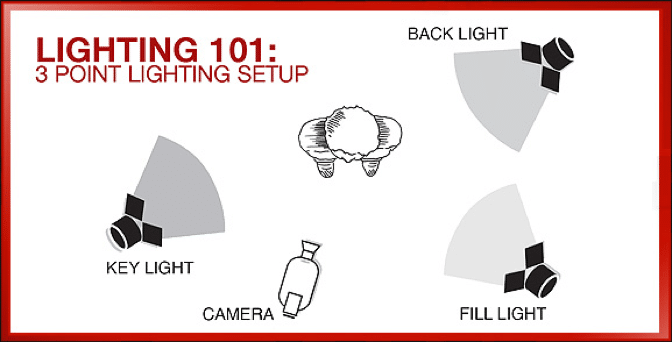
On the other hand, if you are working with little to no equipment, you can take advantage of natural light. Windows are key to good natural lighting! Stand with your back towards the window and have your product, speaker or model in front of you, facing towards the window.
Subjects
- What are you shooting?
- What is the purpose of your video?
- What story or information are you trying to convey?
Ask yourself these questions to help guide you on choosing the best subject for your video. If you are demonstrating a product or service, it is best to have a speaker explaining what is going in on the video. If you are doing a recap of an event, it is best to video at least one person, if not more, at the event along with short clips of “happenings” at the event to tie in later while editing.
PRO TIP: If you are filming a person or group of people, make sure to print out a model release form and have each person fill it out. This could potentially protect your production and yourself from legal risks. Click here for a free model release form from eForms.
3. Video Editing – Made Easy

There is an abundance of video editing programs available on the market, but below are a few programs for those who are just starting out with video editing.
Video editing on a phone:
- iMovie, which is a cookie cutter way of editing videos for those of you who are moderately experienced with editing videos (although it is easy to learn).
- Quik or Splice, which are both apps on your phone to create short videos (perfect for social media).
All of which are free to download on iPhones and/or Androids.
Video editing on a desktop:
- iMovie, which is for Mac users who are moderately experienced with editing videos (although it is easy to learn).
- Premiere Pro, which is a paid program by Adobe for editors with more experience.
While editing your videos keep in mind that you are not only trimming the bloopers and blending your videos, but also make sure to add an opener or introduction-type of element whether it is someone speaking or a text overlay over a background. You can also add text throughout your video or at the end of your video to include a call to action, your website address, logo, your phone number or your company hashtag.
Consumers’ attention spans are at an all-time low, so while editing your videos try to keep them under one minute long, especially starting out.
PRO TIP: So, you filmed a lot of great content and don’t know what to keep and what to take out… Break up your video into smaller videos to stay under one minute and to create more content!
4. Post Video to Social Sites

When posting your videos, you can simply upload them to each social site (Facebook, Instagram, Twitter, etc.), or you can create a YouTube channel and upload it to your channel.
There are several benefits to posting on YouTube:
- First of all, it is free to both create a YouTube Channel and post videos.
- YouTube has 1 billion users registered making it a great way to expose your brand and expand your content’s reach.
- All of your videos can live in one place.
- YouTube provides a link that you can embed on your website, blog, email and social media sites.
We hope you have given some thought into joining the other 81% of businesses that use video as a marketing tool. Refer back to these 4 steps to help your video and editing process run smoothly or contact us to discuss video options today.
Until next time—Happy shooting, editing, posting, marketing and selling!